Introduction
Introducing FirewallFabrik
FirewallFabrik manages firewall policies for Linux-based firewall platforms, currently supporting Netfilter/iptables and nftables. It provides a GUI built with Python and PySide6 (Qt6).
With FirewallFabrik, you manage firewall policy by creating objects that describe your firewall, servers, and subnets, then dragging those objects into policy rules. FirewallFabrik ships with predefined objects for standard protocols and services. Once a policy is built in the GUI, you compile it and install it on one or more firewall machines.
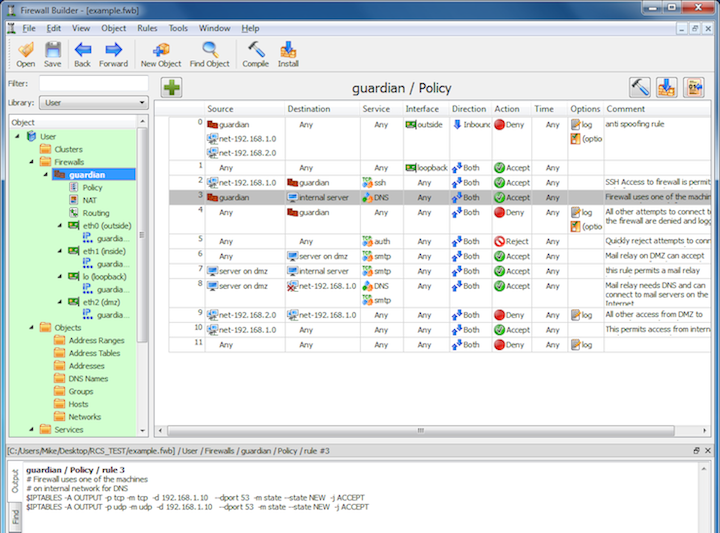
Overview of FirewallFabrik Features
FirewallFabrik helps you write and manage configuration for your firewalls. It generates iptables shell scripts and nftables configurations for you. You can then deploy the generated scripts manually, through your existing automation (Ansible, CI/CD pipelines), or using the built-in installer. FirewallFabrik provides search functions and full undo/redo history. It allows you to reuse the same address and service objects in the rules of many firewalls. It simplifies coordinated changes of the rules and helps avoid errors in generated configurations.
FirewallFabrik can generate iptables and nftables configurations. You do not have to remember all the details of their syntax and internal operation.
Rules built in the GUI look exactly the same and use the same set of objects describing your network regardless of the actual firewall platform you use. You only need to learn the program once to be able to build or modify configuration for iptables or nftables.
Configuration files for the target firewall are auto-generated, so they don't have syntax errors and typos. FirewallFabrik has information about features and limitations of supported firewall platforms. This means you can detect errors before you actually enter commands on the firewall, when it is too late. FirewallFabrik helps you avoid many types of errors at the earliest opportunity; for example, it can detect rule shadowing, a common cause of errors in the policy structure.
Create an object to represent your network, a server, or service once and use it many times. Port number or address changes? No need to scan all the rules of all firewalls to find them. Just change them in the object, recompile, push updated configuration, and you are done. The GUI provides search and search and replace across all firewalls to find every rule that references a given object.
If you work for a large distributed organization with many administrators, you can organize address and service objects that describe your network into libraries for easy reuse across firewalls.
FirewallFabrik supports adding IPv6 rules to existing firewall policies. Create objects describing your IPv6 network, add them to the same rule set that defines your security policy for IPv4, and configure it as a "mixed IPv4+IPv6 rule set". The program generates two configurations, one for IPv4 and another for IPv6, using correct objects for each. There is no need to maintain two policies in parallel for the transition from IPv4 to IPv6.
FirewallFabrik has been designed to manage both dedicated remote firewalls and local firewall configurations for servers, workstations, and laptops.
FirewallFabrik can generate scripts that set up interfaces, IP addresses, and other aspects of the general configuration of the firewall machine using configlet templates.
The built-in policy installer uses SSH for a secure communication channel to each firewall and has many safeguards to make sure you never cut yourself off from a firewall in case of a policy mistake. The policy installer can deploy to one firewall or to many firewalls in a batch.
Firewall Policy as Code
FirewallFabrik uses a human-readable YAML file format (.fwf) that works well with version control systems like Git. This supports an Infrastructure as Code workflow for firewall management:
- Version control: Store your
.fwffiles in a Git repository to maintain a full history of every policy change, including who changed what and when. - Peer review: Use merge/pull requests to have policy changes reviewed by a colleague before they are deployed.
- Automated deployment: Integrate the compiled firewall scripts into your existing automation, e.g. an Ansible playbook, a CI/CD pipeline (GitLab CI, GitHub Actions, Jenkins), or a shell script.
- Reproducibility: The generated
.fwscript is fully deterministic -- the same.fwfinput always produces byte-identical output. You can rebuild the exact same firewall state at any time, verify integrity via checksums, and rely ondifforgit diffto confirm that only intentional changes are present. Unlike Firewall Builder, FirewallFabrik does not embed a generation timestamp in the script. Deployment timestamps should be managed by your deployment process (e.g. Ansible, CI/CD pipeline, or a wrapper script that records the deployment time on the target host).
The YAML format also fits into fully automated deployment pipelines.
File Formats
FirewallFabrik uses its own YAML-based file format (.fwf) for storing firewall configurations. This format is human-readable, diff-friendly, and works well with version control systems like Git.
For users migrating from Firewall Builder, FirewallFabrik can import existing Firewall Builder XML files (.fwb) directly. When saving, the data is always written in the new .fwf format. See 17 - Migrating from Firewall Builder for details.
Internally, FirewallFabrik loads all data into an in-memory SQLite database (via SQLAlchemy) for fast querying and editing, with full undo/redo support through database snapshots.
Heritage
FirewallFabrik is a port of Firewall Builder, a firewall configuration tool registered on SourceForge since 2000.
The core concepts and object model are preserved; the implementation moves from C++ to Python, Qt5 to Qt6, and XML to YAML. FirewallFabrik is an independent project; credit for the underlying design goes to the original Firewall Builder developers.
A Short History of Firewall Builder
Firewall Builder was originally written by Vadim Kurland (NetCitadel), who is the author of the large majority of the codebase. Active development on the original SourceForge repository stopped in 2012. After that, the project lived on in two community forks, both maintained primarily by Sirius Bakke. FirewallFabrik builds on the most advanced of these, so it inherits the full set of features accumulated across all three lines. All three share the same root commit (2007), and each fork branches off where the previous one stopped.
-
Original SourceForge repository -- git.code.sf.net/p/fwbuilder/code
- Last commit: 2012-03-22, by Vadim Kurland.
- Status: the canonical, now unmaintained Firewall Builder. It established the object model, GUI, and roughly ten platform compilers.
-
First community fork -- github.com/Uninett/fwbuilder
- Last commit: 2015-07-03, maintained primarily by Sirius Bakke (Uninett).
- Status: a short-lived continuation that branches off the SourceForge head.
- Added since SourceForge: a JunOS backend and a Cisco NX-OS backend, a diff viewer for rule sets and generated files (with an optional external diff tool and autocompile on load), search by port number or IP address, fragmentation service objects, dummy objects for policy rules, and the first Qt5 support. On the iptables side it switched to the
conntrackmodule instead ofstateand added support for the-wlock option of newer iptables versions, plus macOS and Windows build fixes.
-
Second community fork -- github.com/fwbuilder/fwbuilder
- Last commit: 2023-07-23, maintained primarily by Sirius Bakke.
- Status: the most advanced line and the direct basis for FirewallFabrik.
- Added since the first fork: Qt6 support, the qmake/automake build replaced with CMake, CI moved to GitHub Actions, IPv6 entry in address ranges and a set of well-known IPv6 addresses, dark theme support, renaming of object-tree subfolders, and the
FWB_RES_DIRresource path variable. On the iptables side it added--kerneltzsupport. The remaining work was largely modernization: MSVC 64-bit builds and a move to modern C++.
For the platform compatibility matrix and what FirewallFabrik carries forward, defers, or drops, see 17 - Migrating from Firewall Builder.
How FirewallFabrik Compares to Other Tools
If you are evaluating FirewallFabrik for your environment, it helps to understand how it differs from other firewall management tools. FirewallFabrik is a centralized firewall policy design, compilation, and audit tool. It does not run on the firewall itself -- it models your network objects in a database, lets you design and review rules in a desktop GUI, and then compiles them into deployment-ready configurations for your firewalls.
This is a fundamentally different approach from tools like UFW, firewalld, pfSense, or OPNsense. Crucially, FirewallFabrik is not a replacement for deployment tools like Ansible or Terraform -- it complements them. FirewallFabrik produces the shell scripts; your existing automation pipeline deploys them. The following comparisons help you decide whether FirewallFabrik is the right fit for your use case.
vs. UFW
UFW ("Uncomplicated Firewall") is a command-line interface for managing firewall rules on a single Linux host. It targets setups like ufw allow 22/tcp.
| Aspect | FirewallFabrik | UFW |
|---|---|---|
| Approach | Offline compiler generating shell scripts | Live CLI running on the firewall |
| Clustering | Failover groups, state sync (conntrackd) | No |
| Custom chains | Automatic and user-defined branching | No |
| IPv6 | Full dual-stack compilation | Supported but basic |
| Multi-firewall | Yes -- single database, many firewalls | No -- per-host only |
| NAT | Full SNAT, DNAT, Masquerade, Redirect, Load Balancing, SDNAT | Manual editing of before.rules |
| Object model | Rich: hosts, networks, groups, services, interfaces, clusters | None -- just rules with IPs/ports |
| Routing | ip route generation, ECMP |
No |
| Rule analysis | Shadowing detection, optimization, negation handling | None |
When to use UFW instead: You have a single server with a handful of simple allow/deny rules and want to manage them directly on the command line.
When to use FirewallFabrik instead: You manage multiple firewalls, need NAT, clustering, or complex rule sets, or want reusable objects and rule analysis.
vs. firewalld
firewalld is a dynamic firewall daemon that runs directly on the host. It uses a zone-based model and supports instant runtime changes via its D-Bus API.
| Aspect | FirewallFabrik | firewalld |
|---|---|---|
| Approach | Offline compiler | Live daemon (D-Bus API) |
| Abstraction | Objects + rules compiled to scripts | Zones + services + rich rules |
| Multi-firewall | Yes | No -- per-host daemon |
| NAT | Full NAT matrix | Masquerade per zone, basic port forwarding |
| nftables | Native compiler backend | Uses nftables as backend (since v0.6) |
| Object model | Hierarchical groups, address tables, service groups | Flat zones, predefined services |
| Rule complexity | Arbitrary rule chains, negation, branching | Rich rules cover basics, limited nesting |
| Runtime changes | Recompile + redeploy | Instant (reload or permanent) |
When to use firewalld instead: You manage a single host, need instant runtime changes, or rely on tight integration with NetworkManager and systemd.
When to use FirewallFabrik instead: You need centralized management of multiple firewalls, complex NAT configurations, custom chain branching, or rule shadowing analysis across your infrastructure.
vs. pfSense / OPNsense
pfSense and OPNsense are complete firewall operating systems based on FreeBSD. They run on dedicated hardware or virtual machines and provide a full web-based management interface.
| Aspect | FirewallFabrik | pfSense / OPNsense |
|---|---|---|
| What it is | Policy compiler + desktop GUI | Full firewall OS (FreeBSD-based) |
| Runs on | Your workstation (designs rules for remote firewalls) | Dedicated hardware or VM (is the firewall itself) |
| Captive portal | No | Yes |
| DHCP/DNS | No | Built-in (ISC DHCP, Unbound) |
| Firewall engine | Currently generates iptables/nftables; open to additional backends | PF (Packet Filter) on FreeBSD |
| HA | Cluster modeling + conntrackd | Native CARP + pfsync |
| IDS/IPS | No | Suricata/Snort integration |
| Multi-firewall | Yes -- central management from one database | No -- each appliance is managed individually |
| NAT | Comprehensive for iptables/nftables | Comprehensive for PF |
| Package ecosystem | No | Extensive (HAProxy, Squid, ntopng, ...) |
| Rule analysis | Shadowing detection, optimization | Basic duplicate detection |
| Traffic shaping | Partial (MARK/CLASSIFY for tc) | Full ALTQ/CoDel integration |
| VPN | No | OpenVPN, WireGuard, IPsec |
| Web UI | No (desktop Qt6 GUI) | Yes -- full web management |
When to use pfSense/OPNsense instead: You want an all-in-one firewall appliance with built-in VPN, IDS/IPS, DNS, DHCP, and a web UI -- typically for branch offices, small-to-medium businesses, or lab environments.
When to use FirewallFabrik instead: You need to design, compile, and deploy firewall rules across multiple firewalls from a central workstation. FirewallFabrik does not replace a firewall appliance -- it replaces the need to manually write and maintain firewall rules. It currently targets iptables and nftables, with the architecture open to additional backends.
Strengths of FirewallFabrik
- Visual overview across all firewalls -- see the policies of all your firewalls side by side in one application. Useful for spotting gaps and inconsistencies that are invisible when managing firewalls individually.
- Audit and traceability -- every rule references named objects (hosts, networks, services) rather than raw IP addresses and port numbers. This provides clear traceability: you can instantly find all rules across all firewalls that reference a specific server or service. During audits, reviewers can understand the intent of each rule without deciphering cryptic iptables syntax.
- Centralized multi-firewall management -- design rules for dozens of firewalls from one database. A change to a shared object (for example, updating a server's IP address) is automatically reflected in every rule that references it.
- Rich object model -- define hosts, networks, and services once, reuse them across all your firewalls. This eliminates duplication and ensures consistency.
- Complements Infrastructure as Code -- FirewallFabrik generates standard shell scripts that integrate naturally into any automation pipeline. Use Ansible, Terraform, CI/CD pipelines, or the built-in SSH installer to deploy the compiled output. FirewallFabrik provides the design and compilation layer; your existing automation handles deployment.
- Compiler intelligence -- automatic rule shadowing detection, optimization, and negation handling catch errors at compile time, before they reach your firewalls.
- Full NAT support -- SNAT, DNAT, Masquerade, Redirect, Load Balancing, SDNAT, NONAT.
- Dual-stack IPv4/IPv6 -- separate compilation passes with automatic version filtering.
- Cluster support -- model failover groups and state synchronization.
- Idempotent output -- the generated shell scripts can be re-applied safely. They flush and rebuild the entire rule set on each run, so the result is always the same regardless of the firewall's previous state.
- Reproducibility -- generated shell scripts are fully deterministic (no embedded timestamps) and human-readable. The same input always produces byte-identical output. Store the
.fwfsource file in version control to maintain a complete history of every policy change.
Limitations of FirewallFabrik
- No live runtime -- FirewallFabrik is not a daemon. Changes require recompilation and redeployment.
- No network services -- it does not provide VPN, DNS, DHCP, or IDS/IPS.
- No web UI -- it is a desktop application (Qt6), not a web-based tool.
- Currently iptables and nftables only -- additional compiler backends (e.g. PF) could be added in the future, but are not available yet (as of 2026).
- No traffic monitoring -- it compiles rules but does not observe or visualize live traffic.
Supported Platforms
FirewallFabrik's architecture is platform-agnostic -- the object model, rule engine, and GUI are independent of any specific firewall backend. Additional compiler backends can be added as the need arises. Currently, two backends are available:
- iptables -- the Netfilter firewall framework; the FirewallFabrik compilation pipeline includes 55+ rule processors.
- nftables -- the successor to iptables, merged in Linux 3.13 (January 2014) and default on current Linux distributions. It addresses several long-standing iptables limitations:
- Kernel/userspace split -- the kernel runs a small pseudo-VM (inspired by BPF). The
nftuserspace tool parses the rule set, compiles it to bytecode, and hands it to the kernel. Adding support for new protocols or matches only requires a userspace update, not a kernel patch (Linux 3.13 release notes). - Unified syntax -- one tool (
nft) and one rule language for IPv4, IPv6, ARP, and bridge filtering, instead ofiptables,ip6tables,arptables, andebtables. - Atomic and incremental updates -- rules can be added, removed, or replaced without flushing and rebuilding the entire table, and changes to tables/chains can emit notifications.
- First-class sets and maps -- named sets of addresses, ports, or interfaces are part of the language itself, replacing the external
ipsetkernel module used with iptables. - Less code, fewer kernel extensions -- the bytecode-based design eliminates large amounts of duplicated match/target code that iptables required per protocol.
- Kernel/userspace split -- the kernel runs a small pseudo-VM (inspired by BPF). The
- Backwards compatibility -- on modern distributions, the
iptablescommand is provided byiptables-nft, which translates iptables rules into nftables bytecode. xtables modules continue to work. This is why FirewallFabrik's generated nftables scripts include anft flush rulesetstep on systems wherenftis available (see 17 - Migrating from Firewall Builder).
Both backends produce deployment-ready output: shell scripts with individual iptables commands or iptables-restore batch format for iptables, and nft batch files for nftables.
Platforms from Firewall Builder Not Carried Forward
Firewall Builder supported compilation to ten firewall platforms. FirewallFabrik currently ships with iptables and nftables backends and adds native nftables support, which Firewall Builder never had. Three retired platforms (Cisco FWSM, Cisco PIX, HP ProCurve) have been dropped entirely, while others (Cisco ASA/IOS/NX-OS, ipfilter, ipfw, JunOS, PF) are candidates for future backends.
For a detailed platform compatibility matrix and migration instructions, see 17 - Migrating from Firewall Builder.