Configlets
Generated firewall scripts are assembled from fragments called "configlets" (iptables) or Jinja2 templates (nftables). Each configlet or template contains placeholders that the compiler replaces with actual strings and values when it generates a firewall configuration. Normally, you don't need to think about them.
However, if you have the need, you can use your own configlets or templates, or modify the existing ones. This lets you change virtually all aspects of generated configuration files.
Configlets (iptables)
Default configlets are bundled with the FirewallFabrik package under resources/configlets/. If you create a firewallfabrik/configlets directory in your home directory and place files with the same name there, FirewallFabrik will use those configlets instead. You need to retain the structure of subdirectories inside this directory. For example, Linux configlets stored in $HOME/firewallfabrik/configlets/linux24 will override the bundled configlets in resources/configlets/linux24.
Configlets provide the commands the built-in policy installer needs to install the policy on the firewall. Two configlets are used for Unix-based firewalls: installer_commands_reg_user and installer_commands_root. You can change the behavior of the installer by creating a copy of the configlet file in $HOME/firewallfabrik/configlets and modifying it.
Jinja2 Templates (nftables)
The nftables compiler uses Jinja2 templates instead of configlets. The default templates are bundled under resources/templates/nftables/. The same override mechanism applies: place custom templates in $HOME/firewallfabrik/templates/nftables/ and they will take precedence over the bundled ones.
For example, to customize the nftables shell script wrapper, copy resources/templates/nftables/script.sh.j2 to $HOME/firewallfabrik/templates/nftables/script.sh.j2 and modify it. Jinja2 templates use {{ variable }} for variable substitution and {% if condition %}...{% endif %} for conditional blocks.
Configlet Example (iptables)
In this section, we show how modifying a configlet lets you tailor your generated configuration file.
First, generate a basic firewall policy using a template. Then, tell the firewall to always accept SSH connections from the management server at 192.168.1.100 by entering that address in the "Always permit ssh access from the management workstation with this address" field in Firewall Settings.
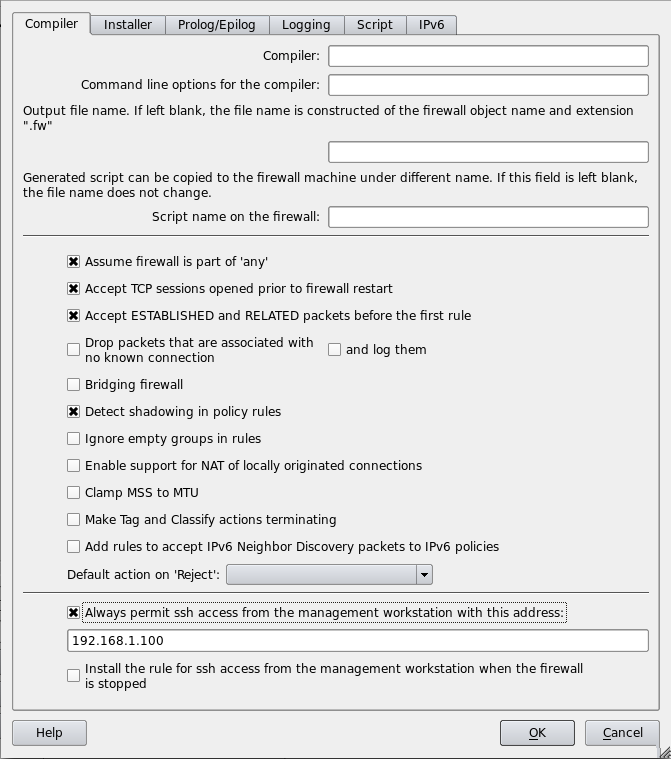
Save and compile the firewall. The generated .fw file contains:
# --------------- Table 'filter', automatic rules
# accept established sessions
$IPTABLES -A INPUT    -m state --state ESTABLISHED,RELATED -j ACCEPT
$IPTABLES -A OUTPUT   -m state --state ESTABLISHED,RELATED -j ACCEPT
$IPTABLES -A FORWARD  -m state --state ESTABLISHED,RELATED -j ACCEPT
# backup ssh access
$IPTABLES -A INPUT  -p tcp -m tcp  -s 192.168.1.100/255.255.255.255 \
    --dport 22  -m state --state NEW,ESTABLISHED -j    ACCEPT
$IPTABLES -A OUTPUT  -p tcp -m tcp  -d 192.168.1.100/255.255.255.255 \
    --sport 22  -m state --state ESTABLISHED,RELATED -j ACCEPT
Now suppose we want to limit SSH access to the management interface of the firewall.
First, we copy the bundled resources/configlets/linux24/automatic_rules to $HOME/firewallfabrik/configlets/linux24/automatic_rules.
mkdir -p $HOME/firewallfabrik/configlets/linux24
cp <firewallfabrik-package>/resources/configlets/linux24/automatic_rules \
    $HOME/firewallfabrik/configlets/linux24/automatic_rules
Then, open the copy in a text editor and find this section:
{{if mgmt_access}}
# backup ssh access
{{$begin_rule}} INPUT  -p tcp -m tcp  -s {{$ssh_management_address}}  --dport 22  \
        -m state --state NEW,ESTABLISHED -j  ACCEPT {{$end_rule}}
{{$begin_rule}} OUTPUT  -p tcp -m tcp  -d {{$ssh_management_address}}  --sport 22  \
        -m state --state ESTABLISHED,RELATED -j ACCEPT {{$end_rule}}
{{endif}}
Modify it to restrict SSH to a specific interface:
{{if mgmt_access}}
# backup ssh access
{{$begin_rule}} INPUT -i {{$management_interface}} -p tcp -m tcp \
        -s {{$ssh_management_address}}  --dport 22 \
        -m state --state NEW,ESTABLISHED -j  ACCEPT {{$end_rule}}
{{$begin_rule}} OUTPUT  -o {{$management_interface}} -p tcp -m tcp \
        -d {{$ssh_management_address}}  --sport 22 \
        -m state --state ESTABLISHED,RELATED -j ACCEPT {{$end_rule}}
{{endif}}
The variable {{$management_interface}} is documented in the comment at the top of the configlet file.
After saving and recompiling, the generated script now specifies the interface:
# backup ssh access
$IPTABLES -A INPUT -i eth1 -p tcp -m tcp \
        -s 192.168.1.100/255.255.255.255  --dport 22 \
        -m state --state NEW,ESTABLISHED -j  ACCEPT
$IPTABLES -A OUTPUT  -o eth1 -p tcp -m tcp \
        -d 192.168.1.100/255.255.255.255  --sport 22 \
        -m state --state ESTABLISHED,RELATED -j ACCEPT